
<body>
  <canvas id="myCanvas" width="150" height="100"></canvas>
  <script type="text/javascript" src="main.js"></script>
</body>
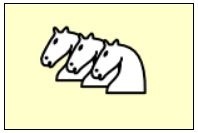
このサンプルでは、画像ファイル white_knight.png を canvas 要素の上に描画しています。
Context オブジェクトの drawImage() メソッドは、画像ファイルをロードし終わった後に呼び出す必要があるため、Image オブジェクトの onload イベントハンドラで描画を行っています。
window.onload = () => {
    // Get a canvas context.
    const canvas = document.getElementById('myCanvas');  // HTMLCanvasElement
    const ctx = canvas.getContext('2d');  // CanvasRenderingContext2D

    // Draw a image.
    const img = new Image();
    img.onload = () => {
        ctx.drawImage(img, 20, 10);  // Draw the image at (20, 10).
        ctx.drawImage(img, 40, 15);  // Draw the image at (40, 15).
        ctx.drawImage(img, 60, 20);  // Draw the image at (60, 20).
    };
    img.src = './white_knight.png';
};